|
bit
0 or 1 used for Off or On
Acronym: bt = zoo-u-fooo (bit: zero
or one used for off or on).
- Mathematically, 0 and 1 are
the two
digits of the binary (aka base 2) number system.
- Bit (biht) is a
contraction of binary digit (BII-nair-ee DIH-jit).
- In computing, 0 is used
as shorthand for off; 1 is used as shorthand for on.
|
 |
But Max.
Are bits real? Can I see them? |
| Well, K.N., if you mean are there tiny
0s and 1s floating around inside the circuits of your computer, the answer
is no. What does exist are off or on switches that block or send pulses of
electrical current. Bits are symbols that represent what is real, namely,
switches and currents.
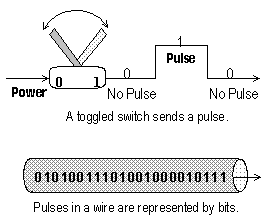
As you can see in the diagram, when a switch is off (0), it blocks
electrical flow and there is no pulse. However, when the switch is toggled
on (1) it permits a pulse of electricity to flow along a wire. When
toggled off again, it blocks the pulse.
Like a form of Morse Code, it is these off/on pulses that send messages
to other parts of the computer and eventually to us.
|
 |
|
As a Unit of Measure
Bits are also used to measure capacities and speeds.
For large numbers of bits we add prefixes such as K or M followed by a lowercase "b"
as in:
- Kb = Kilobit (KIL-oh-bit) = Thousand bits (actually 1,024).
- Mb =
Megabit (MAAG-uh-bit) = Million bits
(technically 1,024 x 1,024 = 1,048,576).
|
|
So what good are bits
to me?
|
|
When it's time to buy or upgrade a computer system, T.E., you'll use bits to
compare the capacities and speeds of various components. You may have to decide,
for example, whether to get a 32- or 64-bit CPU, a 16- or 32-bit data bus, a
33.6 or 56 Kbps (bits per second) modem, or a 10 or 100 Mbps network connection.
These measurements have a direct bearing on how fast, how well, or even if,
your computer can do the job you want it to do.
As the smallest unit of software, bits are the building blocks for bytes, the
next term in the Digital Dozen.
|
Click here to return to the top of this page
|