|
Program
Instructions to the computer.
Languages, Operating Systems,
Applications, Utilities--write, control, process, fix.
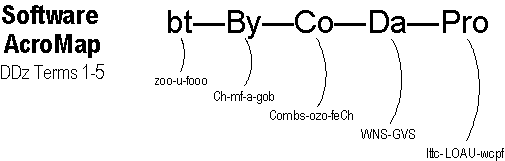
Acronym: Pro = Ittc-LOAU-wcpf (pronounced IT-see LOH-ow WIK-puf).From now on, whenever you hear the Computerese term program,
immediately translate it into its English synonym instructions.
Non-computer examples of programs include meal recipes (Add 3 tsp of vinegar;
blend 1 minute...), appliance operating instructions (Enter the desired minutes;
push Start...), and device assembly steps (Take part A; attach to part B...).
Being made
of hardware (electronics, metal, plastic), without programs a computer can't do
much when you turn it on except get warm. Like an able assistant, you must tell
a computer what you want it to do.
|
|

|
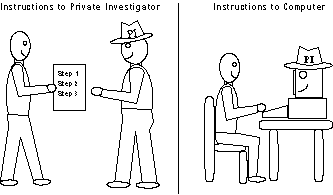
Imagine that
you've hired a Private Investigator (PI). He knows how to do his job, but
he won't know what you want him to do unless you give him a list of
instructions. Similarly, a computer knows how to do its job, but it won't
know what you want it to do unless you give it a list of Program
Instructions (PI). |
|
|

|
|
Program Categories/Functions
- Languages write
- Operating Systems control
- Applications process
- Utilities fix
|
|

|
Acronym:
LOAU-wcpf (LOH-ow WIK-puf)
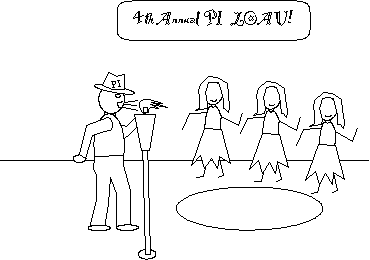
Imagine that your Private
Investigator is attending the 4th Annual PI LOAU in Hawaii
(although a real Hawaiian party is called a luau.) Now imagine
that while dancing the hula, he gets so warm he tries to wcpf a
flaming Tiki torch, that is, blow out its wick with a puff of air. |
|
|
Languages--Programs
used to write
other programs.
Every program you use on a computer
had to be written by a human using a special type of program called a language.
Just as there are hundreds of human languages (English, Spanish, Russian, etc.),
there are hundreds of computer languages (BASIC, C++, JAVA, etc).
|
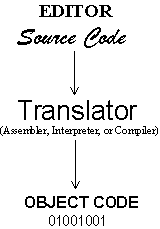
Four Language Components (BrainAid:
ESTO).
Editor
The Editor is a text processor
(a small program in itself) that lets the programmer type and edit
(modify) instructions on the computer screen.
Source Code
What the programmer types is considered the origin or
"source" of the program. Source code typically looks a lot like
English, but it follows special syntax (punctuation) rules.
Example: PRINT
"THE SUM IS"; A+B.
In the box on the right, the words Source Code are displayed in script to help you remember it is written by a human. |

|
Translator
The Translator (a small program in itself) converts the newly written
source code into a form the computer can understand. Depending on the type
of source code used, the translator could be one of three types:
Assembler, Interpreter, or Compiler.
Object Code
The output of the translator is the end result or "object"
of a programmer's efforts. Example: 10000101 0010001 1010011. Also called
"machine" code, it resets the computer's switches to match and
carry out the programmer's instructions.
|
|
Max, when I give an
instruction to the computer am I "programming" it?
|
Not exactly, T.E. True programming involves writing new instructions
to the computer. But you bring up a good point, so let's clarify the
difference between a programmer and a user (BrainAid: PW-US).
Programmer--Writes the original instructions.
User--Selects existing instructions (usually from a menu
or toolbar).
Exceptions: Programmers can "use" the instructions they
write. And users can "program" short sets of instructions--called
batch files, macros, or scripts--to automate repetitive tasks.
|
 |
Think of a
programmer as a restaurant owner who writes new food items on a menu.
Think of a user as a customer who selects
food items from the menu. |
Operating
Systems--Programs that control
hardware, programs, and data, and do housekeeping.
Without an Operating System (OS), a computer
would not work. In fact, OS (OH-ess) programs must be the first ones loaded into
your computer because they contain instructions for controlling and maintaining
everything else. There are dozens of operating systems including
DOS [DAWss] (Disk Operating System), Windows, UNIX,
and Linux [LIH-nux]. |
Four Operating System Functions:
* Control Hardware
For example, when you type data, the OS instructs the computer to
display it on screen. When you want to print, the OS verifies that the
printer is ready and sends the data to it.
* Control Programs
For example, when you start a program, the OS instructs the computer
to find and load it from disk. When you quit a program, the OS frees up
the computer's memory to make room for new programs. |

Acronym:
CHP-DH
Controls Hardware Programs Data Housekeeping
Acrostic: California Highway Patrol--Dept. of Highways.
|
* Control Data
For example, when you save data, the OS finds an available address on
disk and stores your data to it for later retrieval. When you retrieve
data, the OS finds it on the disk at the indicated address.
* Do Housekeeping
For example, when you want to format a disk, copy, erase, or move disk
files, or create new storage folders for files, the OS has commands that
allow you to do so. |
 |
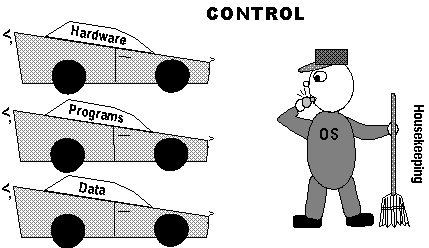
Imagine a
policeman named OS (the boss). In one hand he holds a whistle to control
three cars named Hardware, Programs, and Data. In his other hand he holds
a Housekeeping broom to sweep up the streets (the city budget is
tight!). |
|

|
DISK ORGANIZATION
A major housekeeping function is to let you create folders (aka directories)
to hold files on your disk. Folders follow a hierarchical
(top-to-bottom) order. For example, a main folder may contain two subfolders,
one for your personal files and another for your business files. Your personal
subfolder may contain two sub-subfolders, one for your family files and
another for your school files, and so on.
Folder--Electronic
storage unit for subfolders and files (BrainAid:
ESU-SF).
File--Electronic
storage unit for programs and data (BrainAid: ESU-PD).
|
Applications--Programs
that process
user data.
Applications are the programs users
use to process
raw data into useful information. |
Five Major Applications:
Word Processing--Electronic
typing and editing. The most used application.
Spreadsheet (SS)--Electronic
calculating with numbers "spread" over a full screen.
Database--Electronic
filing cabinet for fast search and retrieval.
Graphics--Create business
charts; presentations; draw; paint.
Communications (CO)--Transmit data
between computers, primarily via Internet/email. |

Acronym
WSDGC-IS
WP, SS, DB,
GR, CO, Integrated, Suite
Acrostic
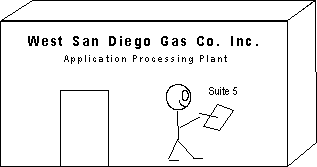
West San Diego Gas Co. Inc.,
Suite 5.
(The "5" refers to
the five major applications that might be integrated or included in a
suite.) |
Application
Packaging:
Standalone--Individual
applications sold separately.
Integrated--Several application modules (which don't have all the
features of a standalone) combined into and sold as a single application.
Software Suite(sweet)--Several standalone applications
sold together for a lower price in order to capture a market. |
 |
|
A coworker told me that macros could
save me a lot of time with my word
processing and spreadsheet
applications.
What's a MACRO? |
|
A macro (MA-kroh) is a file that contains a list of application instructions.
Your coworker was right, B.P., macros can save you loads of time.
Let's
say you needed to repeat a certain multiple-step procedure many times throughout
your workday. Instead of performing those steps manually each time, you can turn
on a macro recorder, perform the steps once, then turn off the macro recorder.
Your steps are saved by the macro. When you want those steps performed again,
you play back the macro. It's like audio taping a list of verbal instructions
you'll replay when needed. |
Utilities--Programs
used to fix
or maintain the computer system.
Generally speaking, every program
that is not a language, operating system, or application falls into the utility
category. |
Three Utility Categories:
Device Drivers--Programs that
tell a computer how to operate a particular device, like a printer,
mouse, CD-ROM, or monitor.
Memory Managers--Programs that tell
a computer how to use memory (see RAM) efficiently; for example, making
sure that multiple programs don't compete for the same section of
memory.
Disk Utilities--Programs that help keep your disk in
order. Common tasks include format, copy, move,
delete, backup, scan, defragment, compress, cache, and virus check. Many
of these programs are included with an operating system's housekeeping
files. |

Acronym
DD-MM-DU
Device Drivers
Memory Managers
Disk Utilities
Acrostic
Dad Digs M&Ms, Do U?
|
|
I just bought a new
printer, and it's not working properly. Something about the DEVICE DRIVER.
What's wrong? |
|
After internal hardware conflicts, incorrect
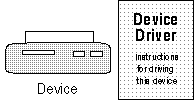
device drivers are probably the biggest cause of computing problems, C.W. Most people assume a device driver is hardware.
They're fooled by the word
"device" (which is indeed hardware, like a printer or monitor). But a "driver" is a utility program.
Think of it as containing the instructions that tell your computer how to "drive" a specific device.
|
 |
A device driver is like a User Manual.
If you tried to operate Device X by following the instructions in User
Manual Y, you'd naturally have problems.
|
|
Device drivers for
many existing devices are
included with your operating system or application programs. You simply select
the desired device name from a list. But when you buy a new device, like
your printer, there's usually a diskette or CD in the box that
contains the new driver, which you must copy to your computer's hard disk. New or updated drivers can
often be downloaded (copied to your hard disk) free from the Internet.
|
|
Max, I worry about
getting a computer virus.
|
|
I don't blame you, K.N., but if you have an up-to-date virus utility, you
can rest easier. The term virus sounds scary, but a virus is merely a
program (instructions to the computer). The difference is that where most
programs contains "good" instructions, viruses contain
"bad" instructions. Viruses don't appear spontaneously; they are
written by humans (as a prank, for a challenge, or with malicious intent).
Some viruses are merely annoying; they may display a taunting message on
your screen. Other viruses cause real damage; they may erase all the files
on your computer.
Viruses can be spread through infected floppy disks, or they can sneak
onto your computer via the Internet. Virus checking utilities scan your
computer for known viruses or for virus-like activity (like a file that
normally doesn't change suddenly growing in size). When a virus utility
finds a virus, it will delete it for you. Since new viruses are being
released all the time, it's important to update your virus utility regularly
via the Internet.
|
|
Software AcroMap--Complete
At
last! Here is the entire Software
AcroMap. Whenever you have a spare
moment, try to sketch it from memory
until it's firmly embedded in your
mind. Of course, the real goal is to
know what each acronym stands for.
Can you recite each term and its
definition word for word?
|
|

|
Software
Spine Acrostic
To memorize the spine of the
Software AcroMap, imagine you were
in a professional wrestling match
and your opponent, whose name was
Co, bit you. The next morning's
sports headlines read that you
were:
Bit
by Co, Da Pro! |
LOAU
Extensions
If you feel ambitious, add the
following riblets to LOAU:
L--ESTO: Editor, Source code, Translator, Object code
O--CHP-DH: Controls Hardware, Programs, Data, Housekeeping
A--WSDGC-IS: Word processing, Spreadsheet, Database, Graphics,
Communications, Integrated, Suite
U--DD-MM-DU: Device Drivers, Memory Managers, Disk Utilities |

|
Click here to return to the top of this page
|