|
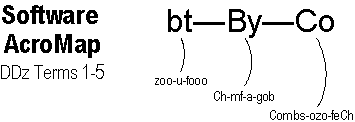
Code Combinations of 01 for each character. Acronym: Co = Combs-ozo-feCh (pronounced Cohmz-ohzoh-fetch).
Note: The term code is used in a different sense when it refers
to programming code. But we'll get to that when we review the fifth term of the
Digital Dozen: Program. |
|||
|
ASCII Code A number of codes are used in computing, but the code common to nearly all computers is called ASCII (ASK-ee). ASCII is an acronym for American Standard Code for Information Interchange, which is quite a mouthful. But it makes some sense when you break it down into its parts:
|
|||

|
But Max, which combinations make which characters? | ||
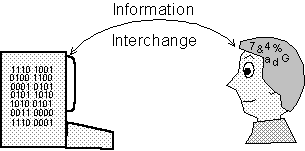
Good question, C.W. 8 bits can be arranged into 256 unique combinations from all off's (00000000) to all on's (11111111) and every combination in between. I've listed some of these combinations and the characters they make in the Partial ASCII Chart below. But here are a few things to consider first.
Decimal vs. Binary
Arithmetically,
each 01 combination has a decimal equivalent. When speaking of a
particular character, it's easier to refer to the decimal rather than the
binary value. For example, it's easier to refer to the
Space character as ASCII 32 instead of ASCII 0010 0000.
Computers Count Funny
Another oddity is that computers begin counting with ZERO. For example,
looking at your hand, you would count your fingers as "1, 2, 3, 4, 5."
But a computer would count them as "0, 1, 2, 3, 4." Likewise, because
the first ASCII character is numbered ASCII 0, the last is numbered ASCII 255
(instead of 256).
Standard ASCII
As originally conceived, ASCII used only seven bits, yielding 128 possible
01 combinations. All ASCII-based computers use the same characters for ASCII
0-127. Hence, they're "standard."
Extended ASCII
To meet the demand for more characters, an eighth bit was
added, doubling the number of possible 01 combinations to 256. However, the
specific characters assigned to ASCII 128-255 vary by country.
The originators of ASCII had the challenge of deciding which 01 combination should
be assigned to which character. But it didn't really matter what they decided, as
long as they all agreed. Here's some of what they came up with.
| ASCII Categories |
|
||
| Decimal | Binary | Character | |
| ASCII
characters fall into three categories.
I. 0-31: Control Characters. For example, when sending a message, ASCII 1 is Start of Heading (SOH) and ASCII 2 is Start of Text (STX). Probably more familiar to you are keyboard keys like ASCII 13 [Enter] and ASCII 27 [Esc]. II. 32-127 = Alphanumerics Observe that the uppercase alphabet begins at ASCII 65 (A); the lowercase alphabet begins at ASCII 97 (a). ASCII 127 is the [Delete] key. III. 128-255 = Miscellaneous. |
0 1 2 3 4 8 32 48 65 97 127 128 170 241 246 255 |
|
Null SOH STX ETX EOT Backspace Space 0 A a Del
Ç
¬ ± ÷ |
ASCII Screen Display
Let's take a very simplified look at how a computer displays a character on
screen:
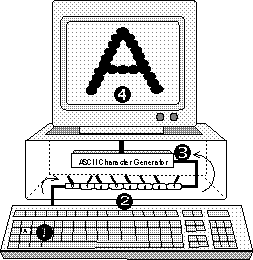
In the figure on the right, (1) Pressing a key sends an electronic signal, which (2) sets a bank of 8 switches off or on, which sends (3) a unique combination of electrical pulses to an ASCII Character Generator which projects (4) dots on the screen in the shape of the character assigned to that off/on pulse combination.
Although only one bank of switches is shown, we can compose messages of almost unlimited length because today's computers contain millions of banks of switches. The interesting thing is, the computer doesn't really know that it's displaying a character at all, just a group of onscreen dots that look to us like a character!